Integrations · WPForms
The right email from every WPForms form, the address verified before you reply.
The RadarAddress plugin for WPForms, Lite or Pro, verifies the email of every submission of every form, with nothing to configure: an unmistakable typo in the domain is corrected and you receive the address to reply to, a mailbox that cannot receive mail is flagged, or refused if you choose so. In the forms where you map the address fields, the street completes while the visitor types and the address is verified on submission. Nothing ever blocks a submission, except the mailboxes you decide to refuse.
What it does
- On the emails·every email field of every form verified on submission: syntax, domain that receives mail, disposable mailbox, role address (info@, …); the certain typo corrected and the original address kept; if you choose so, the refusal with a message under the field
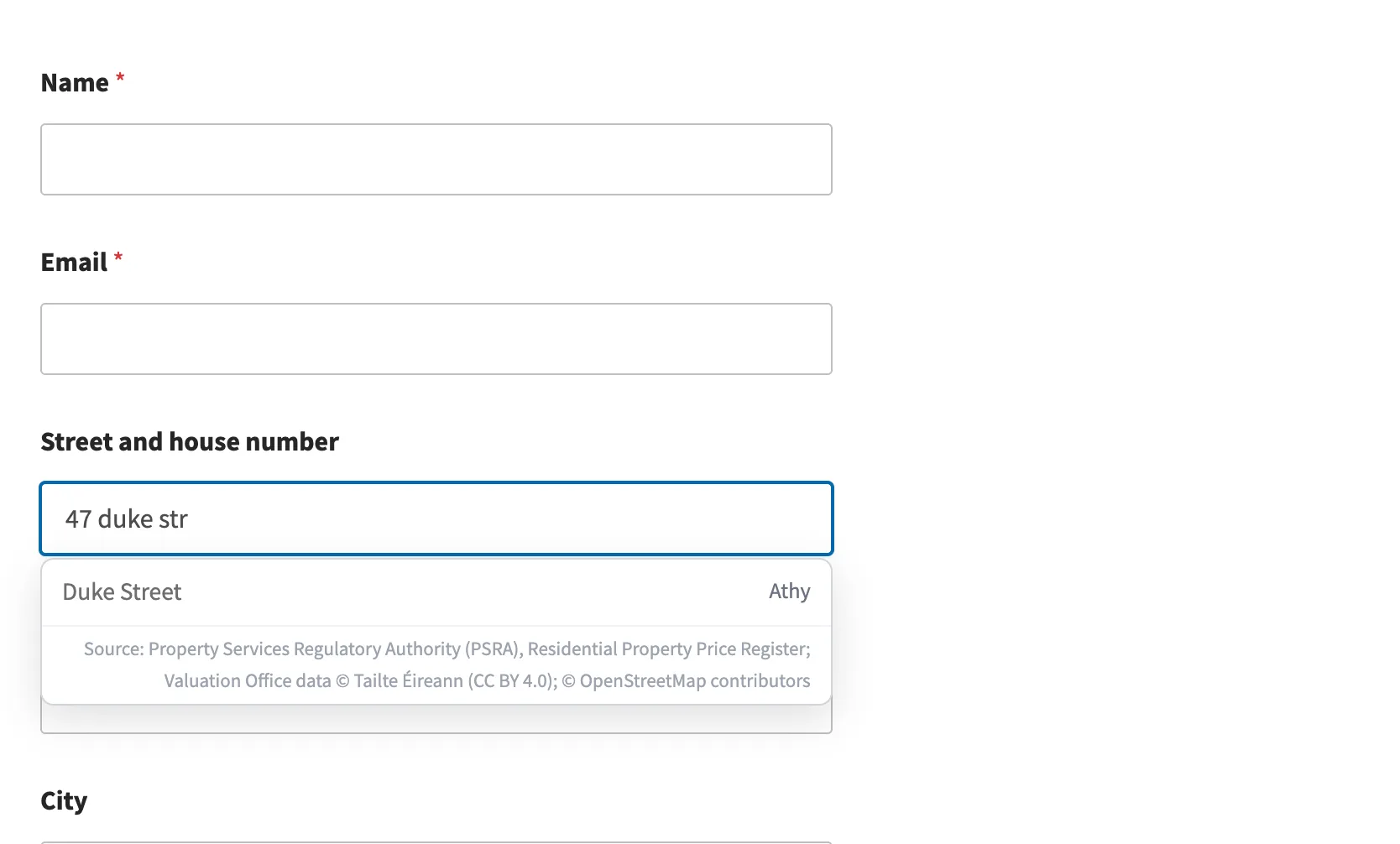
- On the addresses·in the forms where you map the text fields (street, postcode, city, province, country) or the Address field of WPForms Pro: autocomplete while the visitor types, from the address registers of the countries in service; verification on submission with the outcome and the verified form; the visitor's fields are never rewritten
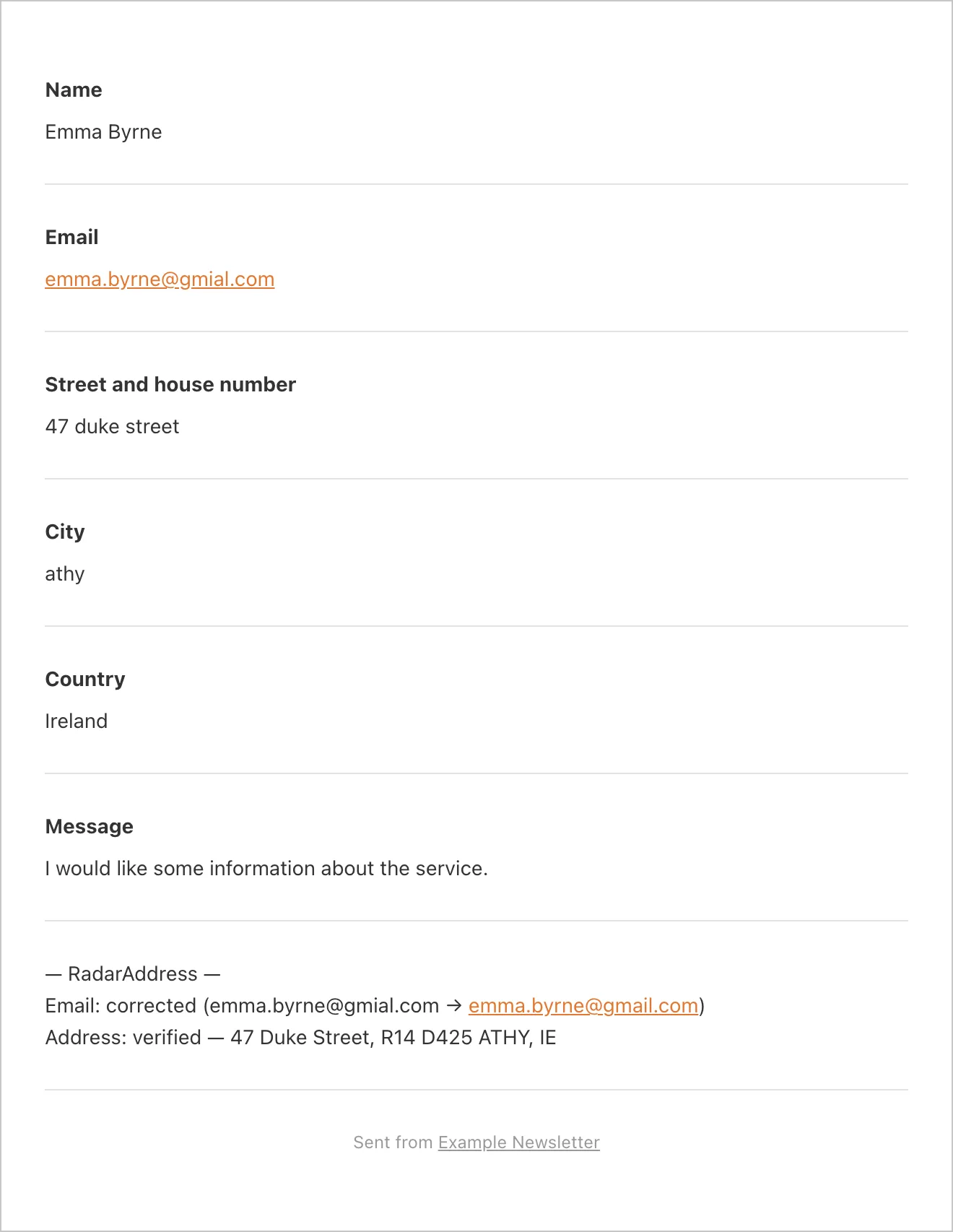
- Where you see the outcomes·at the end of the notification emails, not the ones for the visitor; in the smart tags you can put where you want ({radaraddress_email_outcome}, {radaraddress_outcome}…). The corrected email where it is used: Reply-To and emails to the visitor
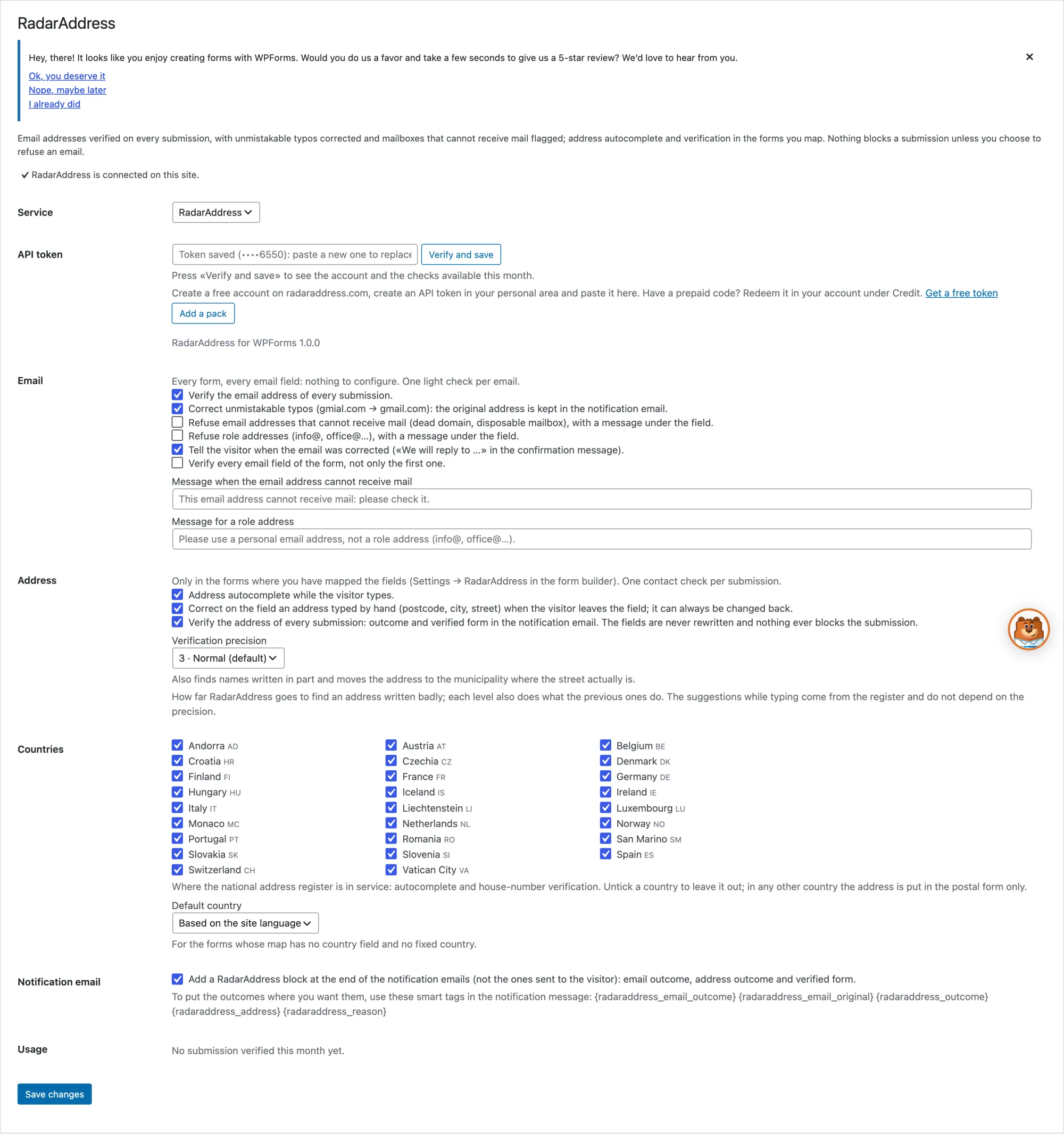
- In the settings·in WPForms → RadarAddress: the token of your account with «Verify and save», the email and address switches, the verification precision (from 1 strict to 5 maximum), the countries, this month's usage
- If we do not respond·the submission goes through as usual, no message to the visitor, the notification says «not verified»
Two examples, as they came out of the engine:
- giulia.bianchi@gmial.com→giulia.bianchi@gmail.com
- kalverstr 92, 1012 PH amsterdam→Kalverstraat 92, 1012 PH AMSTERDAM
What it looks like
Three screenshots from the test site: the notification email, the form, the settings.
How to try it, in three steps
Install the plugin
Download the zip and upload it from Plugins → Add New → Upload Plugin: it includes the thirteen languages and updates from our site. WPForms 1.9 or later is required, Lite or Pro.
Create the account and the token
The account is free, asks for no card and includes an allowance of operations every month: the token is created in one click and the steps are explained there.
Paste and verify
WPForms → RadarAddress: paste the token, press «Verify and save» and submit a test form. The emails are verified from now on; for the addresses open the form in the builder and, in Settings → RadarAddress, say which fields are the street, the postcode, the city, the province and the country.
Requirements: WordPress 6.4, PHP 8.1, WPForms 1.9 or later, Lite or Pro. Interface in the thirteen languages of the site. The code is published under the GPL licence.
The plugin sends RadarAddress the email written in the form and, in the mapped forms, the address, for the suggestions and the verification: nothing else. The privacy policy and the Terms apply; data stays in the European Union.
Frequently asked questions
Does it block the submission if the email is wrong?
Only if you choose so: with the switch on, a mailbox that cannot receive mail, or a role address, is refused with a message under the field, like any other WPForms error. For the address, never: you receive what the visitor wrote and, next to it, the verified form.
Do I have to configure the fields?
Not for the emails: every email field of every form is verified. For the addresses, yes: in the builder, Settings → RadarAddress, five menus; with the Address field of WPForms Pro one is enough.
Where do I see the outcome?
At the end of the notification emails, in a short block. If you prefer a precise place, the smart tags listed in the settings.
Does it change what the visitor wrote?
The address fields, never. The email only for an unmistakable typo in the domain, and only if the option is on: the corrected address replaces the original where it is used (Reply-To, emails to the visitor), the original stays in the notification and in the entry, and the visitor reads the corrected address in the confirmation message.
How much does it cost?
The plugin is free. One light check is counted for every email verified and one contact check for every address verified; typing is free. Every month the first 500 light checks and the first 50 contact checks are free: for most sites nothing else is needed. Beyond that, the packs and subscriptions of the pricing page.
What happens if RadarAddress does not respond?
The submission goes through as usual, with no message to the visitor; the notification says «not verified».
Versions
- 1.0.0 — first release: email verified on every submission (typos corrected, mailboxes that cannot receive mail flagged or refused), address autocomplete and verification in the mapped forms (text fields or the Address field of WPForms Pro), outcomes in the notification emails and in smart tags.
The other integrations: WooCommerce, Contact Form 7, PrestaShop, AcyMailing, Convert Forms, Community Builder, Your own form and Shopify. The list.