Integrations · Community Builder
Verified addresses and emails in the profiles of your Joomla community.
The RadarAddress plugin for Community Builder completes the address while the user types, at registration and in the profile, verifies it on save and puts the outcome in a moderators-only tab; it corrects a certain email typo and flags addresses that cannot receive. The users you already have are checked in bulk. Registers of 26 countries; never a registration blocked for the address.
What it does
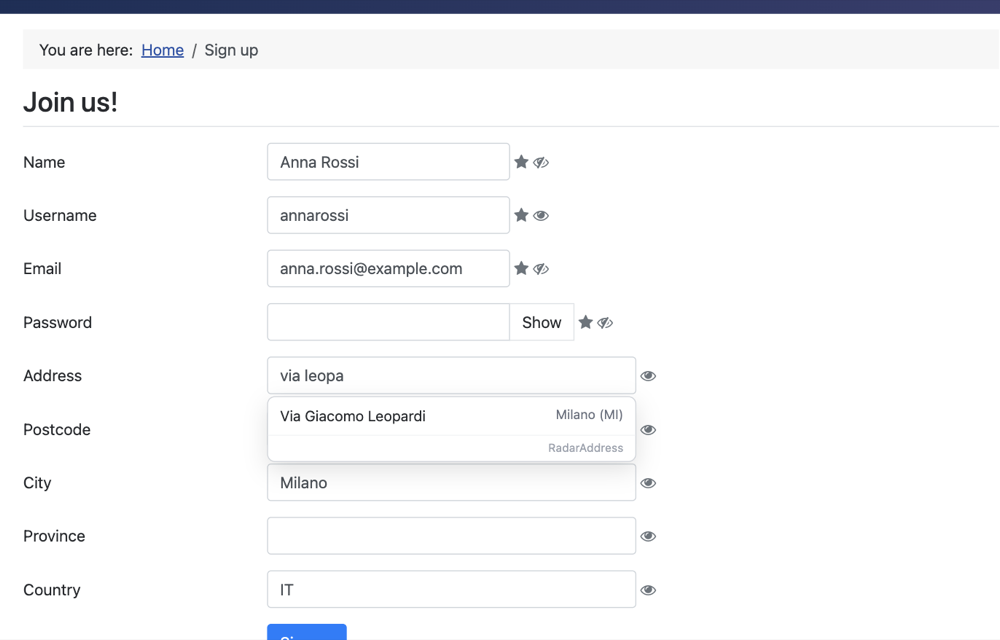
- In the form·at registration and in the profile edit the street completes after two letters, postcode, city and province fill in on selection; an address typed by hand is checked when the user leaves the field
- On save·the address is verified (without calling the service again if the user picked it from the list) and normalised in the mapped fields; the outcome and the verified form go into the “RadarAddress” tab of the profile, seen only by administrators
- The email·at registration a certain typo (gmial.com → gmail.com) is corrected with the original kept; addresses that cannot receive or role mailboxes can be refused with a message, if you choose so
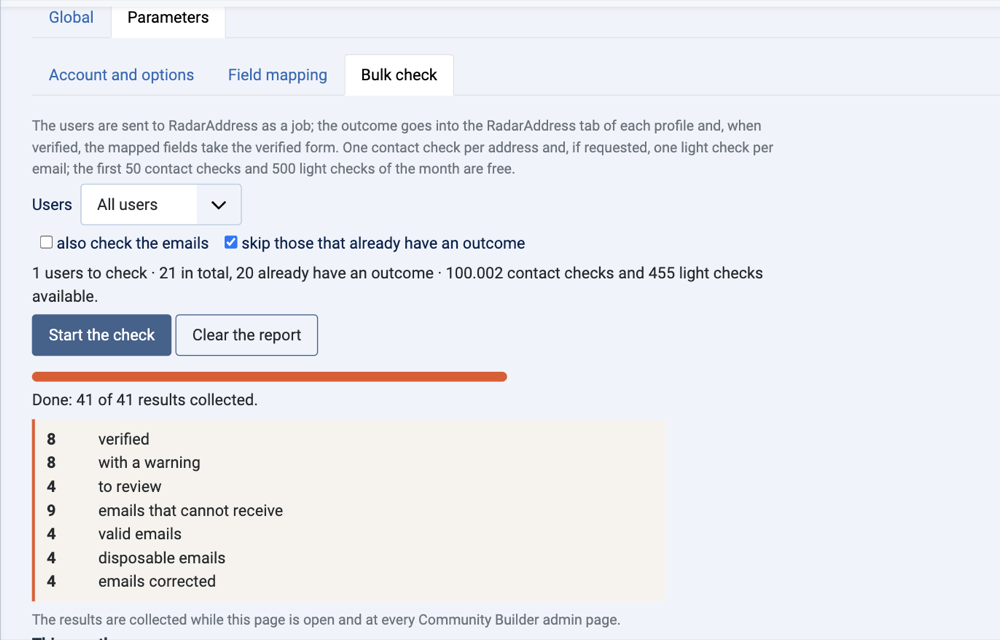
- In bulk·the users you already have, all or one group, with or without the emails, with “skip those that already have an outcome”, the progress and the report by outcome
Three examples, as they come out of the engine:
- via leopardi 4, 20100 milano→Via Giacomo Leopardi 4, 20123 MILANO MI · verified
- anna.rossi@gmial.com→anna.rossi@gmail.com · corrected
- via inesistente 999, milano→to check · the street is not in the municipality
What it looks like
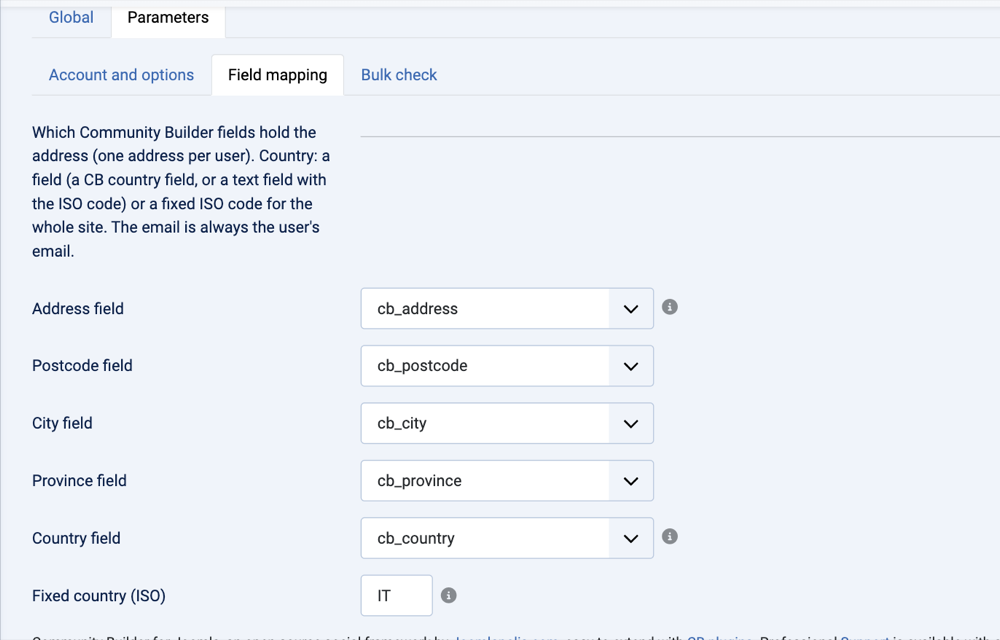
Three screens from the test site: the registration with the suggestion, the field mapping, the bulk check.
How to try it, in three steps
Install the plugin
Download the package and install it from System → Install → Extensions; the plugin enables itself and registers in Community Builder. It needs Community Builder 2.9 or later.
Create the account and the token
The account is free, asks for no card and includes an allowance of operations every month: the token is created in one click and the steps are explained there.
Paste the token and map the fields
Community Builder → Plugin Management → RadarAddress: paste the token, press “Verify and save”, then in the “Field mapping” tab choose which field is street, postcode, city, province and country. Save: from then on registration and profile suggest and verify.
Requirements: Community Builder 2.9 or later (the free one too), Joomla 4.4 or later, PHP 8.1 or later. Interface in the thirteen languages of the site. The code is published under the GPL licence.
The plugin sends RadarAddress the address from the fields you map and, at registration, the email: nothing else. The privacy policy and the Terms apply; the data stays in the European Union and is not kept beyond the check.
Frequently asked questions
Does it work with the free Community Builder?
Yes: the plugin uses the events Community Builder fires in every version, free and paid. It needs Community Builder 2.9 or later on Joomla 4, 5 or 6 (on Joomla 6 without the Backward Compatibility plugin).
Does it block the registration if the address is not found?
Never. The address is verified and, when recognised, normalised in the fields; otherwise it stays as written and the outcome in the tab says “to review”. Only the email can stop the registration, and only if you switch on the option for mailboxes that cannot receive or for role addresses.
Where do I see the outcome?
In a “RadarAddress” tab of the profile, visible only to administrators: outcome and verified form of the address, email outcome and original email, date of the check. They are Community Builder fields, so they can be searched and exported like any other.
How do I tell the plugin which fields are the address?
In the plugin parameters, “Field mapping” tab: pick from the lists the Community Builder field that holds street, postcode, city, province and country. The country can be a field (the CB “country” field too) or a fixed value for the whole site. The email is the user's email.
What does it consume?
The plugin is free. One contact check is counted per verified address (none if the user picked the address from the list) and one light check per email verified at registration. Every month the first 50 contact checks and the first 500 light checks are free; beyond that, the packs and subscriptions of the pricing page, from the plugin with one click.
Can I check the users I already have?
Yes, from the “Bulk check” tab of the parameters: all users or one group, with or without the emails; the plugin sends them to RadarAddress as a job and writes the outcome in each profile, with “skip those that already have an outcome” so you don't pay for them again.
What if RadarAddress does not answer?
Registration and profile work as always: no message to the user, nothing blocked; the outcome says “not verified” and a notice appears in the administration.
Versions
- 1.0.1 — if the site keys change (for example after moving the site), the saved token is no longer read as random characters: the plugin treats it as missing and asks for it again.
- 1.0.0 — first version: address autocomplete and verification at registration and in the profile, email verified at registration with the typo corrected, outcome in the moderators' tab, bulk check of the users.
The other integrations: WooCommerce, PrestaShop, AcyMailing, Convert Forms and Your own form. The list.