Integrations · AcyMailing
The subscribers' emails checked, the typos recovered, the list clean.
The RadarAddress add-on for AcyMailing checks the subscribers' emails — all of them or one list, in a single job — and writes the outcome in a field of each subscriber: valid, corrected, typo, cannot receive, disposable, role address. It corrects the certain typo, flags the addresses that cannot receive or unsubscribes them if you ask; and every new sign-up goes through the same check, without ever losing one.
What it does
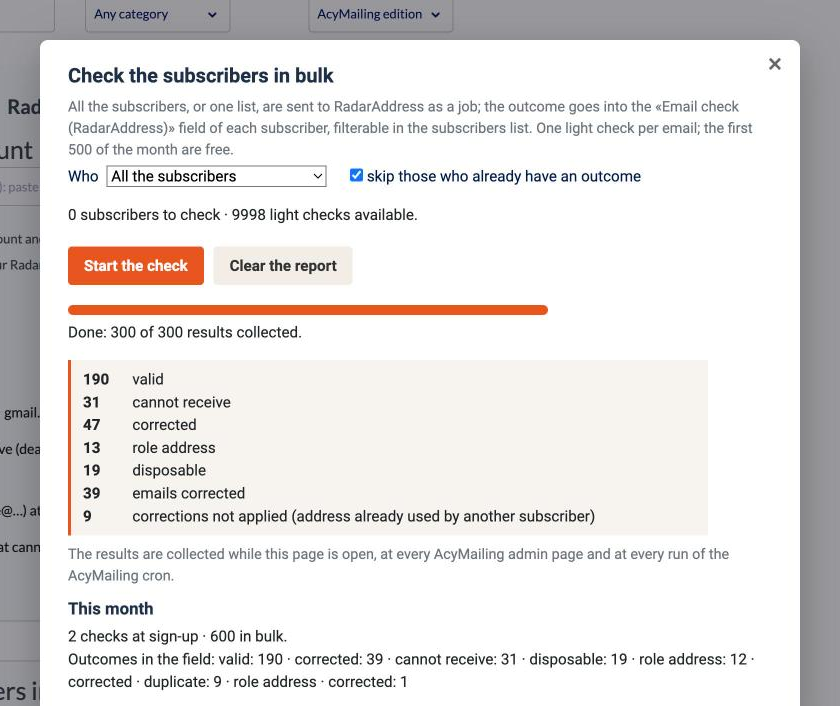
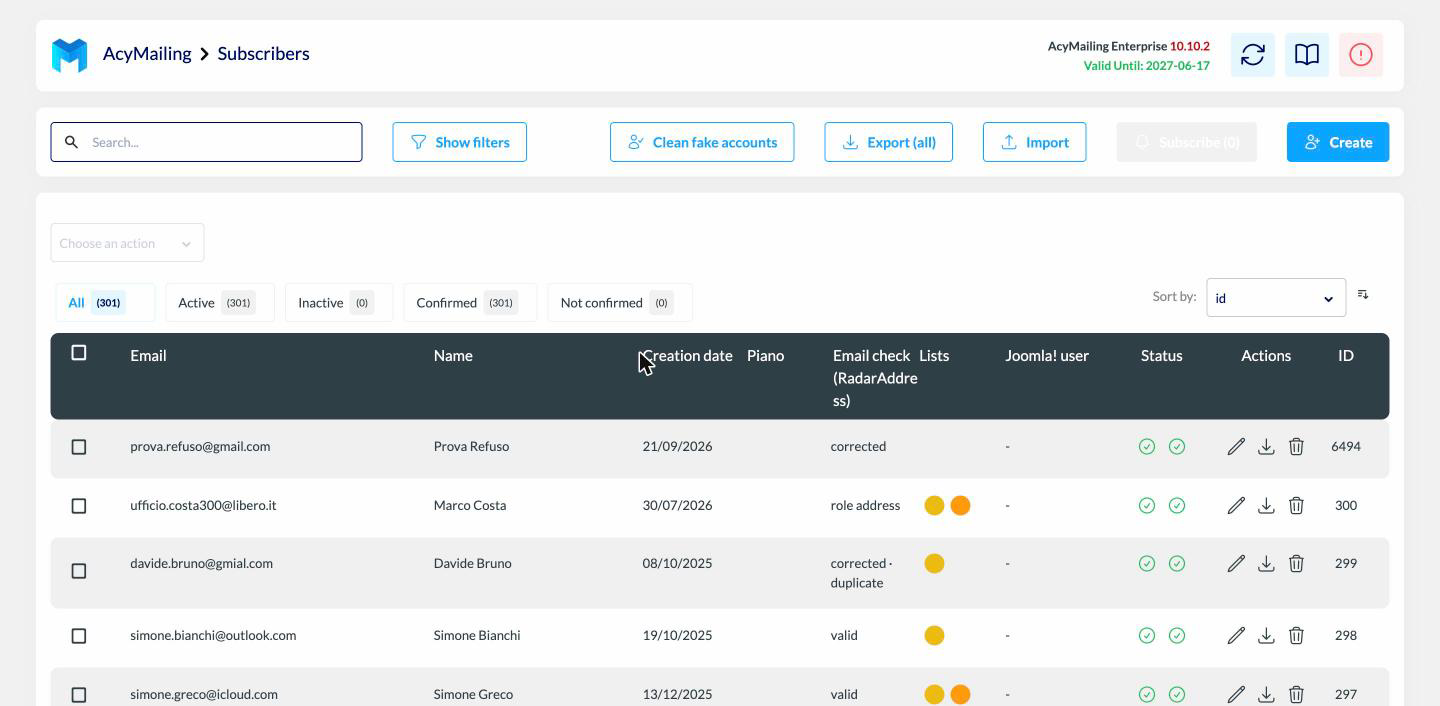
- In bulk·all the subscribers or one list, with “skip those who already have an outcome”; the outcome in the “Email check (RadarAddress)” field, filterable in the subscribers list; the certain typo corrected with the original kept; the unsubscription of those who cannot receive as you choose, from the lists you indicate; the report at the end of the job
- At sign-up·forms, imports and subscribers created from the admin go through the check: typo corrected, addresses that cannot receive refused with a message (option), role addresses as you choose; RadarAddress silent = sign-up accepted
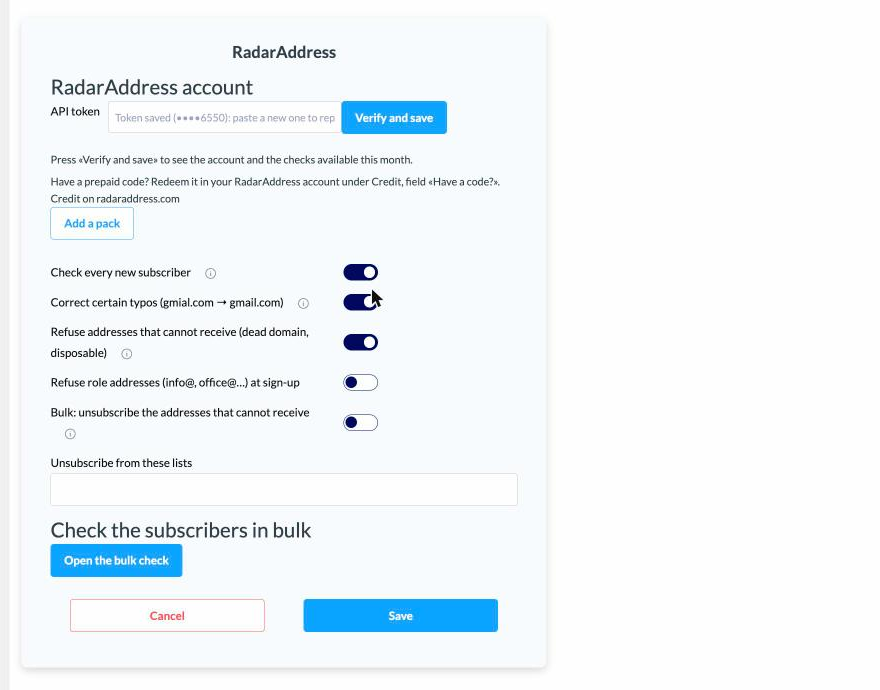
- In the settings·your account token with “Verify and save”, the switches, the lists, this month's usage and the “Add a pack” button with the size already suggested
- With Enterprise·the “RadarAddress: check the emails” action in automations and mass actions, and the “RadarAddress email check” filter for segments and campaigns
Three examples, as they come out of the engine:
- anna.rossi@gmial.com→anna.rossi@gmail.com · corrected
- marco@dominio-che-non-esiste.it→cannot receive · the domain does not receive email
- info@comune-esempio.it→role address · valid, but not a person's
What it looks like
Three screens from the test site: the bulk check with its report, the settings, the outcome in the subscribers list.
How to try it, in three steps
Install the add-on
On Joomla: download the package and install it from System → Install → Extensions. On WordPress: download the plugin and activate it from Plugins → Add New. AcyMailing 10 or later is required, already installed.
Create the account and the token
The account is free, asks for no card and includes an allowance of operations every month: the token is created in one click and the steps are explained there.
Paste and start
AcyMailing → Add-ons → RadarAddress: paste the token, press “Verify and save”, open the bulk check and start it on a list. The outcome appears in the subscribers list as it comes.
Requirements: AcyMailing 10 or later, on Joomla 4 or later or WordPress 6.4 or later, PHP 8.1 or later. Interface in the thirteen languages of the site. The code is published under the GPL licence.
The add-on sends RadarAddress the emails of the subscribers you choose to check and that of every new subscriber: nothing else. The privacy policy and the Terms apply; data stays in the European Union and is not kept beyond the check.
Frequently asked questions
Does it reject subscribers with a typo?
No, it recovers them: a certain typo (gmial.com, hotmial.it) is corrected outright, the original email stays in a field and the outcome says “corrected”. A non-certain suggestion stays a suggestion, written in the field, and the email is left untouched.
Does it unsubscribe anyone by itself?
Only if you ask: by default the outcome goes into the “Email check (RadarAddress)” field of each subscriber and you decide, filtering the list. With the switch on, subscribers whose email cannot receive (non-existent domain, disposable mailbox) are unsubscribed at the end of the job from the lists you choose.
And new sign-ups?
Every new subscriber — from the form, from an import, from the admin — goes through RadarAddress: a certain typo is corrected; an address that cannot receive is refused with a message, if you want. If RadarAddress does not answer, the sign-up goes through as usual: none is ever lost because of us.
How much does it cost?
The add-on is free. One light check is counted for every email verified, in bulk or at sign-up; every month the first 500 are free. Beyond that, the packs and subscriptions on the pricing page: from the add-on you buy with one click, with the size already suggested.
Do I need AcyMailing Enterprise?
No: the bulk check and the sign-up check work with every level, Starter included. With Enterprise you also get the “RadarAddress: check the emails” action in automations and mass actions, and the filter on the outcome.
How long does it take for 50,000 subscribers?
The subscribers go to RadarAddress as a job, not one at a time: the page shows the progress and the results are collected as they come, even with the page closed (at every AcyMailing page and at every run of its cron). The time depends on the queue, usually a few minutes.
Joomla or WordPress?
Both, with the same add-on: on Joomla it installs as an extension, on WordPress as a plugin that hooks into AcyMailing. The settings and the check page are the same.
Versions
- 1.0.5 — on WordPress it hooks into AcyMailing from its own folder, like the official integrations, without copying files elsewhere; AcyMailing 10 or later is required. No change on Joomla.
- 1.0.4 — if the site keys change (for example after moving the site), the saved token is no longer read as random characters: the plugin treats it as missing and asks for it again.
- 1.0.3 — works on Joomla 6 even without the backward compatibility plugin.
- 1.0.2 — one click on "Start the check" is enough; the count also says how many subscribers the list has, how many already have an outcome and how many operations are available.
- 1.0.1 — the settings card widens when it is open; the browser no longer offers saved passwords in the token field.
- 1.0.0 — first version: bulk check of the subscribers with the outcome in the field, certain typo corrected, unsubscription as you choose, sign-up check, action and filter for Enterprise; Joomla and WordPress.
The other integrations: WooCommerce, PrestaShop, Convert Forms, Community Builder and Your own form. The list.