Integrations · Your own form
Address autocomplete in your own form, in three files.
No plugin, no platform: one JavaScript file that attaches to the fields you already have, a ready proxy for your server that keeps the token safe, three lines to connect them. The visitor types, the street completes, postcode, city and province fill in by themselves; a hand-typed address is checked when the field is left. Suggestions from the registers of 26 countries.
What is in the kit
- ra-suggerisci.js·the widget: no dependencies, the same file as the WooCommerce and PrestaShop plugins; it suggests while typing and, on selection, puts the verified address into the fields
- ra-proxy.php·the proxy: keeps the token on the server, accepts only your domain, brakes per visitor, forwards to RadarAddress; if the token is missing or the credit is over it answers with an empty list and the form goes on
- esempio.html·a complete form — country, address, postcode, city, province — that works as soon as the token is in the proxy: copy it and adapt it
- README·the widget options, the proxy contract for those not on PHP, what it consumes
How it's done, in three steps
Create the account and the token
The account is free, asks for no card and includes an allowance of operations every month: the token is created in one click and the steps are explained there.
Put the proxy on the server
Copy ra-proxy.php on the same domain as the form and write the token in the line indicated (better still: in a file outside the web folder, read from there). Nothing else to configure.
Attach the widget to the fields
Include ra-suggerisci.js in the page and give the selectors of your fields: address, postcode, city, province and, if there is one, the country. The widget does the rest.
<script src="ra-suggerisci.js"></script>
<script>
RASuggerisci.attacca({
  url: '/ra-proxy.php',                       // the proxy on your server, never the API
  campi: { indirizzo: '#indirizzo', cap: '#cap', localita: '#citta',
           provincia: '#provincia', nazione_iso2: '#nazione' },   // the country is optional
  lingua: 'en'
});
</script>
campi takes any CSS selector. The extra options: onSeleziona receives the verified record (normalized address, outcome, coordinates when available), scriviCampo for React and Vue forms, correggiAlBlur to decide whether hand-typed addresses are checked too, headers for a CSRF token towards the proxy. All in the kit's README; the API contract is in the documentation.
Requirements: any web page and, for the kit's proxy, PHP 8.0 or later with cURL; otherwise sixty lines in your language. The widget is published under the Academic Free License 3.0.
What happens in the form
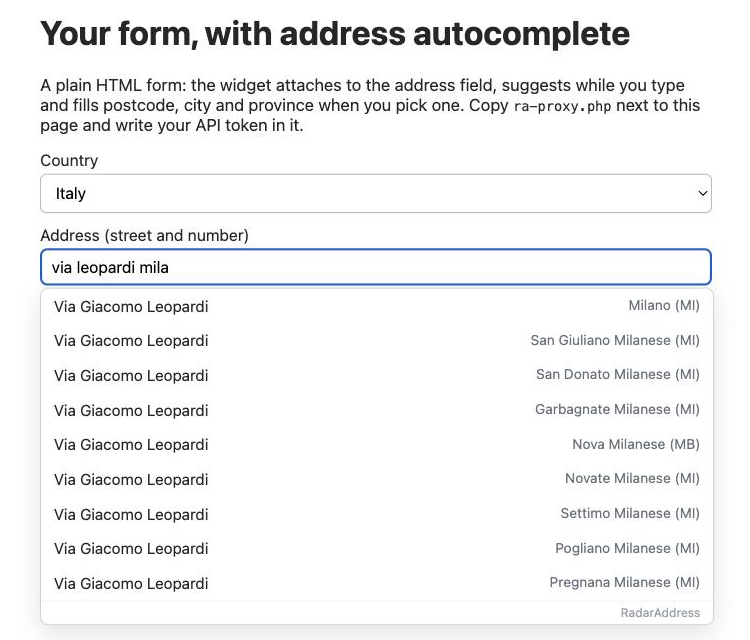
- While typing·after two letters the widget proposes the streets, with the full name and the municipality; further letters filter what it already received, without calling the server at every keystroke; a postcode and city already filled in narrow the search
- On selection·the verified address goes into the fields in the correct form — street in full, house number, the right postcode even in the big zoned cities, city and province — and one contact check is counted; the house numbers of the street complete with no further charge
- Typed by hand·whoever ignores the list and types everything is checked on leaving the field: if the address is recognized, the fields are tidied up; if not, it stays as it is. Nothing ever blocks the submission
- Abroad·with the country given, the suggestions come from that country's register and the visitor writes the way people write there, even everything in one field; the register's attribution sits at the bottom of the list
Frequently asked questions
Why a proxy? Can't I call the API from the page?
The API token gives access to your credit: anyone could read it in the page. The widget only talks to an address on your own site; there, a sixty-line file adds the token and forwards. The kit's PHP proxy is ready: copy it, write the token, done.
My site is not in PHP.
The proxy is the reference, not a requirement: it receives the JSON from the browser, adds the Authorization header with the token, forwards to /api/v1/suggest and returns the answer. It can be rewritten in any language in minutes; the README describes the contract.
Does it work with React, Vue, Angular?
Yes: the widget attaches to the fields with any CSS selector. Controlled forms want the value written with the native setter: the scriviCampo option does that, and it is the one the WooCommerce plugin uses on the block checkout.
What does it consume?
Typing is free. One contact check is counted when the visitor picks an address from the list (or when a hand-typed address is checked on leaving the field, if you keep correggiAlBlur on): one per address, not per keystroke. Every month the first 50 are free; beyond that, the packs and subscriptions of the pricing page.
What if the credit runs out, or RadarAddress does not answer?
The widget stays silent and the form works as always: no message to the visitor, no submission blocked. The proxy returns an empty list on 401, 402 and on any network error.
Does it work abroad?
For every country in service: all it takes is a field with the country's ISO code (a select with IT, DE, FR… or a hidden field) given in nazione_iso2. The visitor writes the way people write in their country, even everything in one field; the popup shows the register's attribution.
Can I change how the popup looks?
The widget brings its own styles, no CSS file: the variables --ra-sugg-bg, --ra-sugg-bordo and --ra-sugg-hover on your page change the colours; the class is .ra-sugg-pop for the rest.
Versions
- 1.0.0 — first version of the kit: widget, PHP proxy with brakes and origin check, example form, README.
The other integrations: WooCommerce, PrestaShop, AcyMailing, Convert Forms and Community Builder. The list.