Integrations · WooCommerce
The right address at checkout, the order verified before shipping.
The RadarAddress plugin for WooCommerce completes and corrects the billing and shipping address while the customer types — classic and block checkout, in the countries where the address register is in service — and verifies every order on the server: outcome and correct form next to the order, a dot in the list for those to review. The customer can always write whatever they want: nothing ever blocks the order.
What it does
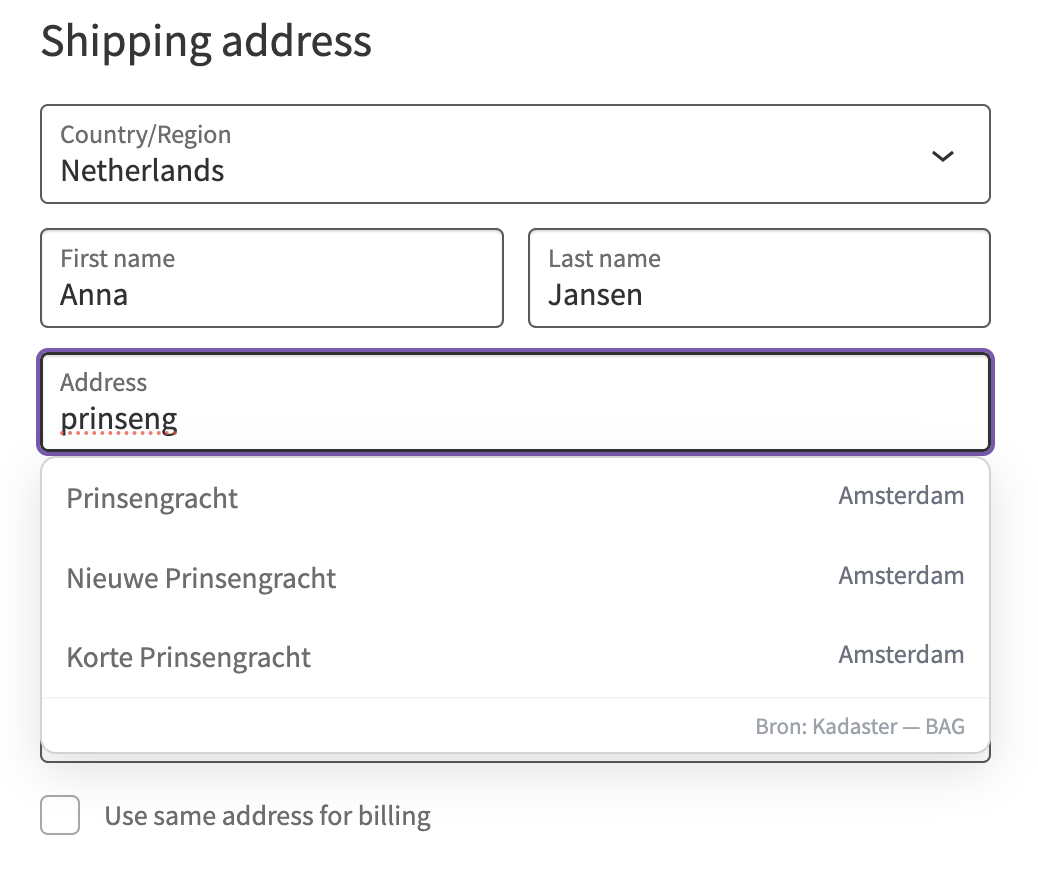
- At checkout·autocomplete on billing and shipping while the customer types; postcode and house number come from the register on selection; an address typed by hand is corrected on the field when the customer leaves it (option), and can always be edited
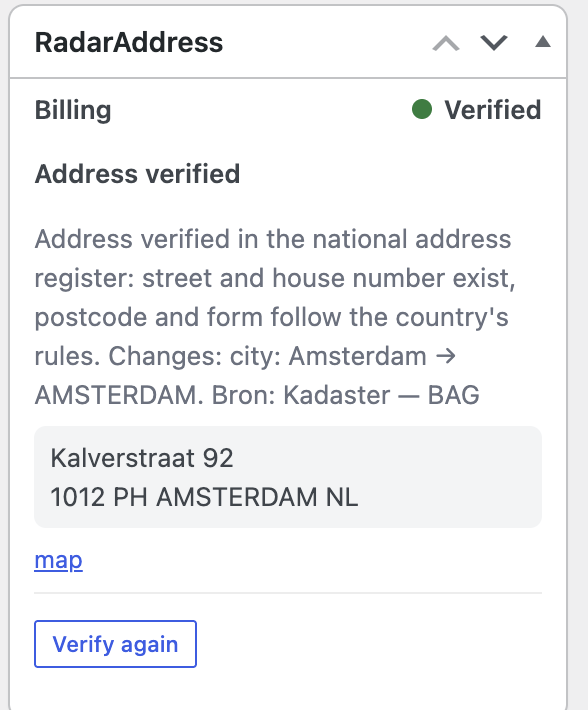
- On orders·every new order verified on the server; in the list a dot (verified, warning, to review, not verified) and a filter; in the order page the verified address, the coordinates, the reason and a button to apply it; bulk action and verification of existing orders
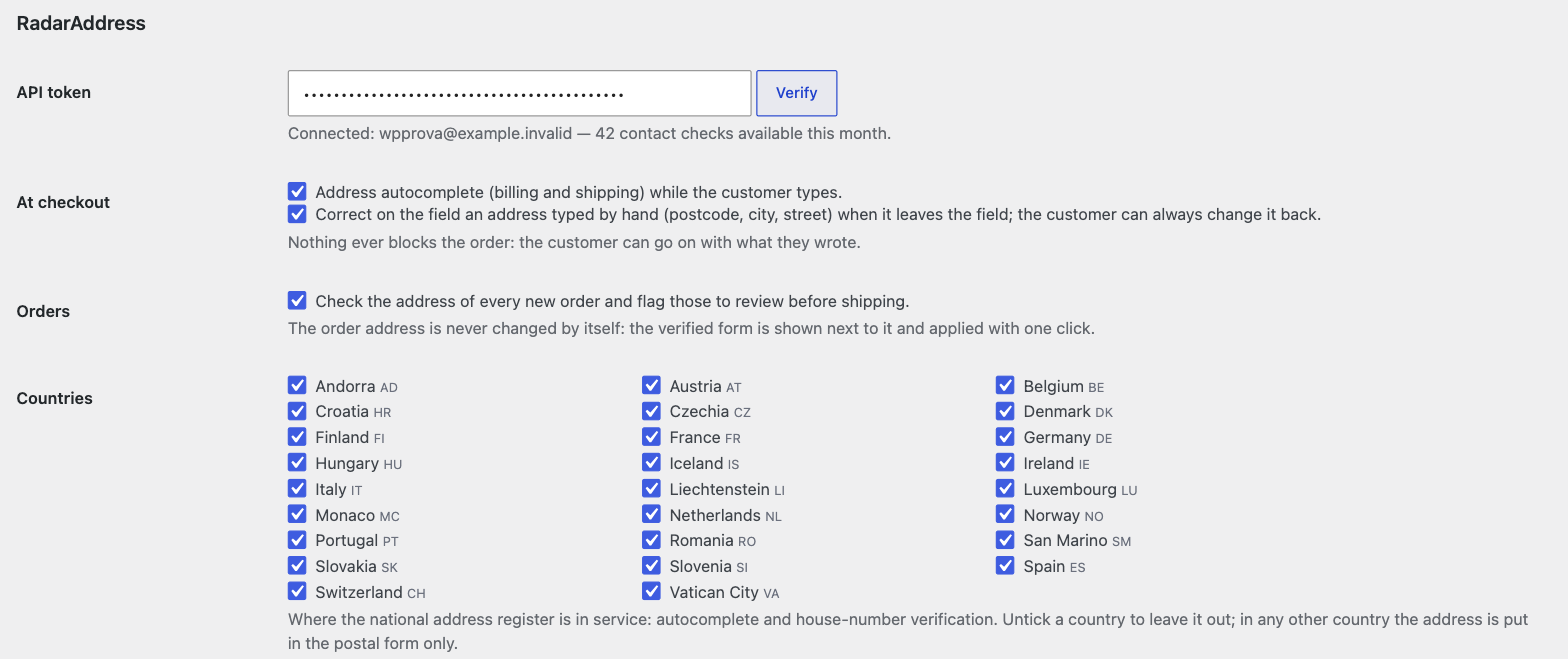
- In the settings·your account token with "Verify", the choice of countries, this month's usage
- If we do not respond·the checkout goes on as usual, no message to the customer, the order is checked again later
An example from Netherlands, as it came out of the engine:
- kalverstr 92, 1012 PH amsterdam→Kalverstraat 92, 1012 PH AMSTERDAM
What it looks like
Three screens from the test shop: the popup at checkout, the order page, the settings.
How to try it, in three steps
Install the plugin
From Plugins → Add New search for "RadarAddress" and install it: it updates from WordPress.org. Or download the zip and upload it with Upload Plugin: it includes the thirteen languages and updates from our site. WooCommerce 8.3 or later is required.
Create the account and the token
The account is free, asks for no card and includes an allowance of operations every month: the token is created in one click and the steps are explained there.
Paste and verify
WooCommerce → Settings → RadarAddress: paste the token, press "Verify" and place a test order. The plugin is active right away, in all the countries in service.
Requirements: WordPress 6.4, PHP 8.1, WooCommerce 8.3 or later; classic checkout and Checkout Block; compatible with High-Performance Order Storage (HPOS). Interface in the thirteen languages of the site. The code is published under the GPL licence.
The plugin sends RadarAddress the address typed at checkout and the order addresses, for suggestions and verification: nothing else. The privacy policy and the Terms apply; data stays in the European Union.
Frequently asked questions
Does it block the order when the address is wrong?
Never. The customer can go on with what they wrote; the order is created and, if the address does not add up, it is flagged "to review" for you.
In which countries does the autocomplete work?
In those where the national address register is in service: the list is in the plugin settings and grows by itself when a new register comes in. In the other countries the address is put in the country's postal form, without suggestions.
Does the plugin change the order address by itself?
No. The verified form sits next to the order address; you apply it with one click, and an order note records before and after.
How much does it cost?
The plugin is free. Typing is free; one contact check is counted when the customer selects an address or when an order is verified, only one per address. Every month the first 50 are free: for a small shop that is often all it needs. Beyond that, the packages and subscriptions on the pricing page.
What happens if RadarAddress does not respond?
The checkout goes on as usual, without suggestions and without messages to the customer; the order is marked "not verified" and a background job checks it again.
Does it work with the block checkout?
Yes, with both: the classic checkout (shortcode) and the Checkout Block of newer shops, from WooCommerce 8.3.
Versions
- 1.0.4 — the zip from our site includes the thirteen languages and updates from here; the version in the WordPress.org directory updates from there.
- 1.0.3 — on the WordPress.org directory: updates come from there, even if you installed it from the zip; code reorganised following the review.
- 1.0.2 — if the site keys change (for example after moving the site), the saved token is no longer read as random characters: the plugin treats it as missing and asks for it again.
- 1.0.1 — the settings explain how to get the token, with a link to the getting started page; fixed the link that opened the sign-in form instead of the sign-up form.
- 1.0.0 — first version: autocomplete and verification at checkout (classic and block), order verification, dot and filter in the list, bulk action, existing orders, settings with token, countries and usage.
The other integrations: PrestaShop, AcyMailing, Convert Forms, Community Builder and Your own form. The list.